

希望帮到你。
起因是Excel 2010 + GPT
GPT really helps
Recently I tried to open Excel 2010, it always popped up a prompt:
the feature you are trying to use is on a network resource that is unavailable.
Use source. C:\MSOCache\All Users\{91140000-0011-0000-0000-0000000FF1CE}-C\ And cannot find this file
GPT: (1st round doesn’t help)
This issue usually occurs when Microsoft Office is trying to access a missing installation file or resource. Here are a few steps to resolve this problem:
Solution 1: Repair Microsoft Office Installation
- Open Control Panel:
- Press
Windows + Rto open the Run dialog. - Type
controland press Enter.
- Press
- Navigate to Programs and Features:
- Find and click on “Programs” or “Programs and Features.”
- Locate “Microsoft Office Professional Plus 2010” in the list.
- Repair the Installation:
- Right-click on “Microsoft Office Professional Plus 2010” and select “Change.”
- Choose the “Repair” option and follow the prompts to repair the installation. This should restore any missing files.
Solution 2: Manually Locate the Installation Source
If the repair option doesn’t work, you may need to provide the missing installation files manually.
- Check for the Source:
- Look for the installation files in a different location. If you have the original installation media (like a CD/DVD or a downloaded installer), insert it or point the dialog to that location.
- Download the Setup Files:
- If you don’t have the installation media, you may need to download the setup files from the official Microsoft website.
Solution 3: Clear the MSOCache Folder
The “MSOCache” folder is used by Office for installation purposes. If it’s corrupted, you may need to clear it.
- Show Hidden Files:
- Open “File Explorer” and go to the “View” tab.
- Check “Hidden items” to display hidden files and folders.
- Navigate to the MSOCache Folder:
- Go to
C:\MSOCache\All Users\. - Delete any folders or files that may be corrupted or incomplete.
- Go to
- Restart Office Installation:
- Try opening Excel again. Office may recreate the necessary files in the MSOCache folder.
Solution 4: Update or Reinstall Microsoft Office
If the above solutions don’t work, consider uninstalling and reinstalling Microsoft Office.
- Uninstall Microsoft Office:
- Go to “Control Panel” > “Programs and Features.”
- Right-click “Microsoft Office Professional Plus 2010” and select “Uninstall.”
- Reinstall Office:
- Use your installation media or download a fresh copy from Microsoft to reinstall Office.
And I can’t find the CD I had 14 years ago.
If I keep clicking cancel, it will go away. Excel works perfectly fine. Just annoying every time I need to press ESC for 15 times
Since you don’t have the original installation CD and the program works fine after dismissing the message, it sounds like Office is trying to access some component or feature that it thinks is missing. Here are a few steps you can try to stop the pop-up from appearing:
GPT: (2nd round helps)
Solution 1: Disable the Windows Installer Prompt
- Open the Registry Editor:
- Press
Windows + Rto open the Run dialog. - Type
regeditand press Enter.
- Press
- Navigate to the Office Registry Key:
- Go to the following path in the Registry Editor:
HKEY_LOCAL_MACHINE\Software\Microsoft\Office\14.0\Common\General
- Go to the following path in the Registry Editor:
- Create or Modify a DWORD Value:
- Right-click on the right pane, select
New>DWORD (32-bit) Value. - Name the new value
DisableOfficeRepair. - Double-click on
DisableOfficeRepairand set the value data to1.
- Right-click on the right pane, select
- Close the Registry Editor:
- Exit the Registry Editor and restart your computer.
This should disable the repair prompt that appears when you start Excel.
Solution 2: Remove Office Startup Entries in Task Scheduler
- Open Task Scheduler:
- Press
Windows + R, typetaskschd.msc, and press Enter.
- Press
- Look for Office-Related Tasks:
- Check under “Task Scheduler Library” for any tasks related to Microsoft Office or Office Updates.
- Disable Office Tasks:
- Right-click on any Office-related tasks and choose “Disable.”
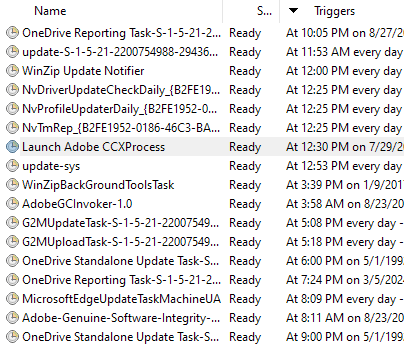
I found so many garbages/junks bothering me for many years here
- OneDrive, biggest 流氓,don’t know how to disable it before, it backed my documents up without my real signature and keeps asking me for $ to register its service!
- Adobe (this is really a bad guy) Use Foxit instead please. I uninstalled Adobe, but it keeps its ADs attacking / stealing my time now and then.
The trigger is “Runs every 6 hours indefinitely”. It is so DIS-GUSTING. - Winzip – runs every day. But it shows its AD bi-weekly to me.
Turn off them, treat yourself better!!
Solution 3: Use the Microsoft Fix it Tool
Don’t try, in my opinion.
Microsoft has a “Fix it” tool that can automatically detect and repair common Office problems, including installer issues.
- Download and Run the Microsoft Fix it Tool:
- Go to the Microsoft Support page and search for “Fix it for Office 2010” or similar tools.
- Follow the instructions to run the tool and see if it resolves the issue.
Solution 4: Edit Windows Installer Settings
- Open the Group Policy Editor (if available):
- Press
Windows + R, typegpedit.msc, and press Enter.
- Press
- Navigate to Windows Installer Settings:
- Go to
Computer Configuration>Administrative Templates>Windows Components>Windows Installer.
- Go to
- Disable Windows Installer:
- Double-click on “Disable Windows Installer” and set it to “Enabled.”
- This will prevent the installer from running, which might stop the prompt. Note that this also affects other installers.
Solution 5: Unregister and Re-register the Windows Installer
- Open Command Prompt as Administrator:
- Press
Windows + Xand select “Command Prompt (Admin)” or “Windows PowerShell (Admin).”
- Press
- Run the Following Commands:cmdCopy code
msiexec /unregister msiexec /regserver- This will unregister and then re-register the Windows Installer service.
Solution 6: Prevent Excel from Accessing Missing Features
- Open Excel Options:
- Open Excel and go to
File>Options.
- Open Excel and go to
- Disable Add-ins:
- Go to the “Add-ins” section and disable any unnecessary add-ins that might be prompting the installer to look for missing resources.
- Check for Startup Macros or Links:
- Check if there are any startup macros or links pointing to missing files. Remove or update these references.
发表评论